Disclaimer: I used Claude Code to trace through the Rails codebase and explain how various parts of it are related to each other. Lately, I've found it an excellent tool to navigate the parts of the codebase that I don't understand and to get a deeper understanding of how things work. It's such a fun process to come across some obscure Rails method, ask Claude (or Cursor) to explain exactly how it works, and learn a few new things in the way. In the past, I would have likely skimmed past it or ignored it altogether.
It's so easy to confuse access to knowledge with having understanding. Vibe learning is even better than vibe coding.
If you've worked on an application that had file uploads, you've likely needed to display images at different sizes. A full-resolution avatar doesn't make sense when you want to show dozens of users' thumbnails on a single page. That's where you need to transform the original image to different variants.
But what actually happens when you call user.avatar.variant(:thumb)? Where does the transformed image get stored? How does Rails know not to regenerate it on every request?
I had these questions ever since I worked with ActiveStorage, so I decided to trace through the source code to learn how variants work. This post documents the end-to-end workflow. As always, I recommend having the Rails source code open on the side while reading.
Overview
Before we dive into the source, here's a high-level overview of the important objects involved:
- Variant - A transformed version of an image blob (resized, cropped, converted, etc.)
- Variation - The transformation instructions (a set of operations like
resize_to_limit: [100, 100]) - VariantRecord - Optional database tracking of generated variants
- Transformer - The actual image processing engine (Vips or ImageMagick)
When you call variant(:thumb), Rails doesn't immediately process the image. It returns a Variant object that represents the intention to transform. The actual processing happens lazily when the variant URL is first requested.
attachment.variant(:thumb)
↓
Returns Variant object (no processing yet)
↓
URL requested by browser
↓
Controller calls variant.processed
↓
Image downloaded, transformed, re-uploaded
↓
Subsequent requests served from storage
Let's walk through each piece.
DSL to Define Variants
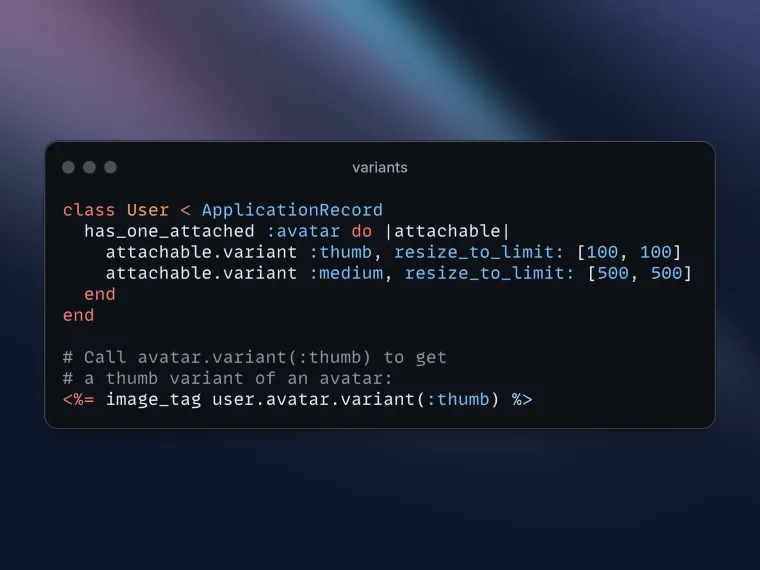
You define named variants in your model as follows:
class User < ApplicationRecord
  has_one_attached :avatar do |attachable|
    attachable.variant :thumb, resize_to_limit: [100, 100]
    attachable.variant :medium, resize_to_limit: [500, 500]
  end
end
This registers named variants through the attachment reflection. The block yields an Attachable object that collects variant definitions.
When you call user.avatar.variant(:thumb), the Attachment#variant method looks up the named variant and extracts its transformations:
# app/models/active_storage/attachment.rb
def variant(transformations)
  transformations = transformations_by_name(transformations)
  blob.variant(transformations)
end

private
  def transformations_by_name(transformations)
    case transformations
    when Symbol
      named_variants.fetch(transformations) do
        raise ArgumentError, "Cannot find variant :#{transformations}..."
      end.transformations
    else
      transformations
    end
  end
So variant(:thumb) becomes variant(resize_to_limit: [100, 100]), which is then delegated to the blob.
The Blob Creates Variant Objects
The blob receives the transformation hash and creates a Variant object. This happens in the Representable concern:
# app/models/active_storage/blob/representable.rb
def variant(transformations)
  if variable?
    variant_class.new(self, ActiveStorage::Variation.wrap(transformations).default_to(default_variant_transformations))
  else
    raise ActiveStorage::InvariableError
  end
end
A few things happen here:
variable?checks if the blob's content type supports transformations. Only image types inActiveStorage.variable_content_typesqualify. Try to callvarianton a PDF and you'll get anInvariableError.Variation.wrapconverts the hash into aVariationobject (more on this shortly).default_toapplies default transformations. Notably, non-web-safe images default to PNG format.variant_classreturns eitherVariantorVariantWithRecorddepending on configuration:
def variant_class
  ActiveStorage.track_variants ? ActiveStorage::VariantWithRecord : ActiveStorage::Variant
end
The track_variants setting determines whether Rails stores variant metadata in the database. We'll explore both classes.
Variation Class Encodes Transformations
Variation encapsulates the transformation instructions and handles their serialization. This is important because variant URLs need to include the transformation parameters in a tamper-proof way.
# app/models/active_storage/variation.rb
class Variation
  attr_reader :transformations

  def self.wrap(variator)
    case variator
    when self then variator
    when Hash then new(variator)
    when String then decode(variator)
    end
  end

  def key
    self.class.encode(transformations)
  end

  def self.encode(transformations)
    ActiveStorage.verifier.generate(transformations, purpose: :variation)
  end

  def self.decode(key)
    new(ActiveStorage.verifier.verify(key, purpose: :variation))
  end
end
The key method generates a signed, URL-safe representation of the transformations. This is what appears in variant URLs. When a request comes in, Rails decodes the key using MessageVerifier and reconstructs the Variation object.
This signing prevents tampering. Without it, an attacker could modify transformation parameters in the URL to trigger arbitrary image operations.
The Variation also handles the actual transformation:
def transform(file, &block)
  transformer.transform(file, format: format, &block)
end

private
  def transformer
    ActiveStorage.variant_transformer.new(transformations.except(:format))
  end
Note: The format option is intentionally excluded from the transformations passed to the transformer constructor because it's handled separately. This separation exists because format serves a different purpose than transformations:
- Transformations (like resize_to_limit, colourspace, rotate) are image processing operations that modify the image content
- Format specifies the output file format (png, jpg, webp, etc.) - it's not an image manipulation but rather an output specification
In ImageProcessing (which Active Storage uses under the hood), the format is typically specified when saving/outputting the final result, not as part of the transformation pipeline. By excluding it from the transformations hash and passing it separately, the code keeps these concerns cleanly separated.
The Variant Class: Lazy Processing
The Variant class represents a specific blob with specific transformations. It's intentionally lazy.
# app/models/active_storage/variant.rb
class Variant
  attr_reader :blob, :variation

  def initialize(blob, variation)
    @blob, @variation = blob, variation
  end

  def processed
    process unless processed?
    self
  end

  def processed?
    service.exist?(key)
  end
end
Notice that processed? checks if a file exists at the variant's key in the storage service. There's no database query, just a service existence check.
The key method generates a unique identifier for this variant:
def key
  "variants/#{blob.key}/#{OpenSSL::Digest::SHA256.hexdigest(variation.key)}"
end
The key combines:
- The original blob's key
- A SHA256 hash of the signed variation key
This is to ensure that each unique transformation of each blob has its own storage location.
The Processing Flow
When processed is called and the variant doesn't exist:
def process
  blob.open do |input|
    variation.transform(input) do |output|
      service.upload(key, output, content_type: content_type)
    end
  end
end- Download the original blob from storage
- Pass it to
Variation#transform - Upload the result to storage under the variant key
Once uploaded, subsequent calls to processed? return true, and the variant is served directly from storage.
VariantWithRecord: Database-Backed Tracking
The basic Variant class works, but it has a limitation: the only way to know if a variant exists is to ask the storage service. This can be slow for certain services and makes it hard to query which variants exist.
VariantWithRecord adds database tracking:
# app/models/active_storage/variant_with_record.rb
class VariantWithRecord
  def processed?
    record.present?
  end

  def process
    transform_blob { |image| create_or_find_record(image: image) }
  end

  private
    def create_or_find_record(image:)
      @record = blob.variant_records.create_or_find_by!(variation_digest: variation.digest) do |record|
        record.image.attach(image)
      end
    end
end
Instead of checking service existence, it checks for a VariantRecord in the database. The variation_digest (a SHA1 hash of the transformations) ensures idempotency.
The VariantRecord model is simple:
# app/models/active_storage/variant_record.rb
class VariantRecord < ActiveStorage::Record
  belongs_to :blob
  has_one_attached :image
end
Each VariantRecord has its own attached image—the processed variant. This is an interesting design: variants are stored as attachments themselves, using the same Active Storage machinery.
Enable this with:
# config/application.rb
config.active_storage.track_variants = true
Transformers Process the Image
The actual image processing is delegated to transformer classes. Rails ships with two options.
Vips Transformer (Default in Rails 7+)
# lib/active_storage/transformers/vips.rb
class Vips < ImageProcessingTransformer
  private
    def processor
      ImageProcessing::Vips
    end
end
ImageMagick Transformer
# lib/active_storage/transformers/image_magick.rb
class ImageMagick < ImageProcessingTransformer
  private
    def processor
      ImageProcessing::MiniMagick
    end
end
Both inherit from ImageProcessingTransformer, which uses the image_processing gem:
# lib/active_storage/transformers/image_processing_transformer.rb
def process(file, format:)
  processor.
    source(file).
    loader(page: 0).
    convert(format).
    apply(operations).
    call
end
The loader(page: 0) loads only the first page, which matters for animated GIFs and multi-page documents.
Security Validations
The transformer validates operations to prevent command injection:
def validate_transformation(name, argument)
  unless ActiveStorage.supported_image_processing_methods.include?(name)
    raise ArgumentError, "Unsupported transformation: #{name}"
  end

  validate_transformation_argument(argument)
end
This is why the docs warn that "It should be considered unsafe to provide arbitrary user-supplied transformations."
Configure the processor in your application:
config.active_storage.variant_processor = :vips # or :mini_magickControllers Serve the Variants
When you render a variant in a view:
<%= image_tag user.avatar.variant(:thumb) %>Rails generates a URL pointing to one of two controllers.
RedirectController (Default)
# app/controllers/active_storage/representations/redirect_controller.rb
def show
  expires_in ActiveStorage.service_urls_expire_in
  redirect_to @representation.url(disposition: params[:disposition]), allow_other_host: true
end
This generates a temporary URL (default: 5 minutes) and redirects to the storage service. The actual file is served by S3, GCS, etc.
ProxyController
# app/controllers/active_storage/representations/proxy_controller.rb
def show
  http_cache_forever public: true do
    send_blob_stream @representation, disposition: params[:disposition]
  end
end
This streams the file through your Rails server. It sets Cache-Control: public, max-age=31536000 because the URL contains the variation hash. If transformations change, the URL changes.
Both controllers inherit from BaseController, which handles the processing:
# app/controllers/active_storage/representations/base_controller.rb
private
  def set_representation
    @representation = @blob.representation(params[:variation_key]).processed
  end
The .processed call triggers lazy processing on first request. Subsequent requests skip processing since the variant already exists.
Preprocessed Variants: Avoiding Lazy Loading
Lazy processing works well, but the first user to request a variant pays the processing cost. For high-traffic images, you can pre-process variants:
class User < ApplicationRecord
  has_one_attached :avatar do |attachable|
    attachable.variant :thumb, resize_to_limit: [100, 100], preprocessed: true
  end
end
When preprocessed: true, Rails enqueues a job immediately after upload:
# app/jobs/active_storage/transform_job.rb
class TransformJob < ActiveStorage::BaseJob
  def perform(blob, transformations)
    blob.variant(transformations).processed
  end
end:preprocessed option is deprecated and will be removed in Rails 9.0. Use the :process option instead.Replace preprocessed: true with process: :later and preprocessed: false with process: :lazily.
attachable.variant :thumb, resize_to_limit: [100, 100], process: :immediately:lazily(default) - Process on first request:later- Process via background job after upload:immediately- Process synchronously during upload
The :immediately option has an optimization. During upload, the file is still in local memory:
# app/models/active_storage/attachment.rb
def process_immediate_variants_from_io(io)
  named_variants.each do |_name, named_variant|
    next unless named_variant.process(record) == :immediately

    blob.variant(named_variant.transformations).process_from_io(io)
    io.rewind
  end
end
Instead of downloading the blob from storage, it processes directly from the uploaded IO. This avoids a round-trip to your storage service.
Avoiding N+1 Queries
When loading multiple records with variants, you can hit N+1 issues. Active Storage provides scopes to eager-load variant records:
# Load all variant records for images
Message.all.with_all_variant_records.each do |message|
  message.images.each do |image|
    image_tag image.variant(:thumb)
  end
end
This preloads the variant_records association, preventing individual queries for each variant check.
Here's how I think about the variant system:
┌─────────────────────────────────────────────────────────────────┐
│                        Your Model                               │
│  has_one_attached :avatar, variants: { thumb: {...} }           │
└─────────────────────────────────────────────────────────────────┘
                              │
                              ▼
┌─────────────────────────────────────────────────────────────────┐
│                       Attachment                                │
│  Resolves :thumb to transformation hash                         │
│  Delegates to blob.variant(transformations)                     │
└─────────────────────────────────────────────────────────────────┘
                              │
                              ▼
┌─────────────────────────────────────────────────────────────────┐
│                          Blob                                   │
│  Creates Variant or VariantWithRecord                           │
│  Wraps transformations in Variation                             │
└─────────────────────────────────────────────────────────────────┘
                              │
                              ▼
┌─────────────────────────────────────────────────────────────────┐
│                    Variant(WithRecord)                          │
│  Generates unique storage key                                   │
│  Lazy processing via .processed                                 │
└─────────────────────────────────────────────────────────────────┘
                              │
                              ▼
┌─────────────────────────────────────────────────────────────────┐
│                        Variation                                │
│  Encodes transformations for URL                                │
│  Delegates to Transformer for processing                        │
└─────────────────────────────────────────────────────────────────┘
                              │
                              ▼
┌─────────────────────────────────────────────────────────────────┐
│                      Transformer                                │
│  Vips or ImageMagick via image_processing gem                   │
│  Validates operations, produces output file                     │
└─────────────────────────────────────────────────────────────────┘
                              │
                              ▼
┌─────────────────────────────────────────────────────────────────┐
│                    Storage Service                              │
│  Variant stored at: variants/{blob_key}/{variation_hash}        │
│  Served via Redirect or Proxy controller                        │
└─────────────────────────────────────────────────────────────────┘
Each module takes care of a specific thing:
- Variant knows about storage keys and existence
- Variation knows about transformations and encoding
- Transformer knows about image processing
- Controllers know about HTTP serving
Important to Remember:
- Variants are lazy by default. No processing happens until the URL is first requested. Use
preprocessed: truefor high-traffic images. - Variant URLs are signed. The transformation parameters are encoded using
MessageVerifier, preventing tampering. - Variant storage keys are deterministic. The same blob with the same transformations always produces the same key. Changing transformations changes the key (and URL).
track_variantsenables database tracking. This replaces service existence checks with database queries and enables variant management features.- The first request pays the processing cost. Either accept this latency or preprocess variants. There's no free lunch.
- Transformers validate operations. Don't pass user input directly to variant methods.
We'll cover following topics in future posts:
- Previews work similarly to variants but for non-image files (PDFs, videos). Check
app/models/active_storage/preview.rb. - Representations unify variants and previews under a common interface. The
representationmethod chooses the right approach based on content type. - Service URLs have configurable expiration. See
ActiveStorage.service_urls_expire_inand how it affects caching strategies.
That covers the variant system. The next time you call variant(:thumb), you'll know exactly what's happening under the hood.
This post is part of a series on Active Storage internals. See also: Understanding the Active Storage Domain Model and Understanding has_one_attached.
That's a wrap. I hope you found this article helpful and you learned something new.
As always, if you have any questions or feedback, didn't understand something, or found a mistake, please leave a comment below or send me an email. I reply to all emails I get from developers, and I look forward to hearing from you.
If you'd like to receive future articles directly in your email, please subscribe to my blog. Your email is respected, never shared, rented, sold or spammed. If you're already a subscriber, thank you.