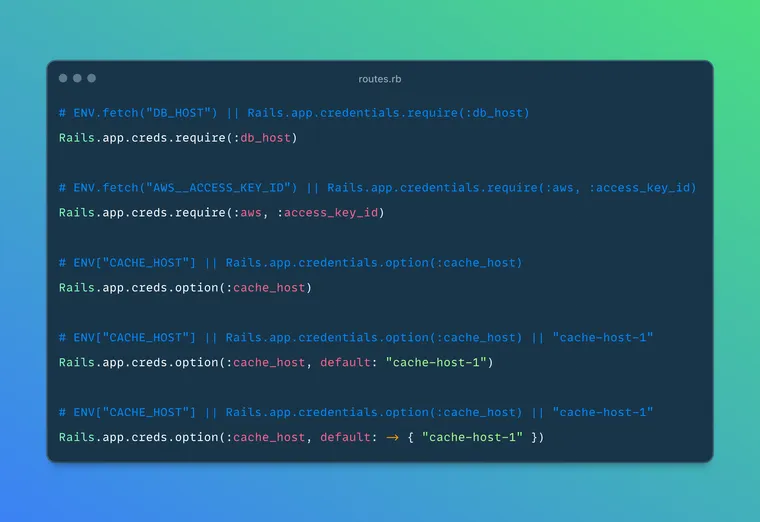
While going through recently merged PRs in Rails, I came across a new feature from DHH, that handles a common concern in app configuration: managing credentials across different configuration backends in a single, consistent manner.
 rails
rails
When you're going through the PR, I highly recommend you also read Jean's (byroot) code review comments and how DHH addresses them (or not). I learned a bunch of interesting Ruby / Rails tidbits just from the back-and-forth between them.
Anyways, the new combined credentials system, accessible via Rails.app.creds, provides a unified API for accessing configuration values from both environment variables and encrypted credential files. In addition, you can create custom configuration if you want than just using environment variables or encrypted files.
What's the Problem?
Before looking at the new feature, let's try to understand what problem it's trying to solve. I'll admit, this is rather a nice-to-have than a pressing problem, but still a nice quality-of-life improvement nonetheless.
Rails has supported encrypted credentials for years, and most teams have also relied on environment variables for production secrets. So you typically store sensitive configuration in one of two places (or both):
- Encrypted credentials files (
config/credentials.yml.enc) for secrets that should be version-controlled. - Environment variables for deployment-specific configuration and CI/CD pipelines.
In practice, that split usually creates a few issues:
- Environment-specific overrides: You might want to use encrypted credentials for most values but override specific ones via environment variables in certain deployments.
- Migration between storage methods: Moving a credential from the encrypted file to an environment variable (or vice versa) required code changes throughout the application. You cannot easily move a secret from one source to the other without touching application code.
- Mix and Match: You end up with two APIs in your code:
ENV.fetch("DATABASE_URL")in some places,Rails.application.credentials.dig(:database, :url)in others.
Again, these are not serious problems, and most teams can work around them just fine, without much trouble. Still, having a built-in framework solution is better than relying on conventions and discipline alone, and that is exactly what the combined credentials feature provides.
Combined Credentials
The combined credentials feature solves these problems by providing a single, consistent interface that checks multiple configuration sources in a defined order.
# Check ENV first, then encrypted credentials
Rails.app.creds.require(:database_url)
# Equivalent to: ENV.fetch("DATABASE_URL") || Rails.app.credentials.dig(:database_url)

# Nested keys work, too
Rails.app.creds.require(:aws, :access_key_id)
# Equivalent to: ENV.fetch("AWS__ACCESS_KEY_ID") || Rails.app.credentials.dig(:aws, :access_key_id)
The system follows a clear precedence order: environment variables are checked first, followed by encrypted credentials. This allows environment variables to override encrypted credentials when needed, such as on the CI/CD servers.
Rails.app.credentials instead of Rails.application.credentials because DHH also added Rails.app as an alias for Rails.application in a separate PR (link).How does it work?
The combined credentials system is built on three classes in ActiveSupport:
ActiveSupport::EnvConfiguration
This class provides an interface for accessing environment variables using symbol-based keys (which is a nice feature in and of itself 😃 ):
# Access ENV variables with symbol keys
Rails.app.envs.require(:db_password)  # ENV.fetch("DB_PASSWORD")
Rails.app.envs.option(:cache_host)    # ENV["CACHE_HOST"]

# Nested keys use double underscores
Rails.app.envs.require(:aws, :region) # ENV.fetch("AWS__REGION")
The EnvConfiguration class automatically converts symbol keys to uppercase strings and joins nested keys with double underscores, following a simple naming convention.
ActiveSupport::EncryptedConfiguration
This class already existed but now provides the same require and option methods as EnvConfiguration:
# Consistent API with environment configuration
Rails.app.credentials.require(:secret_key_base)
Rails.app.credentials.option(:smtp_password, default: "fallback")
ActiveSupport::CombinedConfiguration
This class ties everything together. It accepts multiple configuration backends and queries them in order:
# The default setup
Rails.app.creds = ActiveSupport::CombinedConfiguration.new(
  Rails.app.envs,        # Check ENV first
  Rails.app.credentials  # Then check encrypted credentials
)
API Reference
The combined credentials system provides two primary methods:
require(*keys)
Returns the value for the specified key(s) or raises a KeyError if not found:
# Single key
Rails.app.creds.require(:database_url)

# Nested keys
Rails.app.creds.require(:redis, :url)

# Raises KeyError if not found in any backend
Rails.app.creds.require(:nonexistent_key) # => KeyError
option(*keys, default: nil)
Returns the value for the specified key(s) or the default value if not found:
# Returns nil if not found
Rails.app.creds.option(:optional_feature_flag)

# Returns default value if not found
Rails.app.creds.option(:max_connections, default: 10)

# Default can be a callable
Rails.app.creds.option(:cache_ttl, default: -> { 1.hour })
Examples
- Database credentials
# Before: Inconsistent approaches
database_url = ENV["DATABASE_URL"] || Rails.application.credentials.database_url
redis_url = ENV.fetch("REDIS_URL") { Rails.application.credentials.dig(:redis, :url) }

# After: Consistent interface
# ENV.fetch("DATABASE_URL") || Rails.app.credentials.database_url
database_url = Rails.app.creds.require(:database_url)
# ENV.fetch("REDIS__URL") || Rails.app.credentials.dig(:redis, :url)
redis_url = Rails.app.creds.require(:redis, :url)
- Configure external services with fallback defaults:
# AWS configuration with environment override capability
aws_region = Rails.app.creds.option(:aws, :region, default: "us-east-1")
aws_access_key = Rails.app.creds.require(:aws, :access_key_id)

# Stripe configuration
stripe_key = if Rails.env.production?
  Rails.app.creds.require(:stripe, :live_secret_key)
else
  Rails.app.creds.require(:stripe, :test_secret_key)
end
- Handle optional configuration gracefully:
# Feature flags with defaults
enable_analytics = Rails.app.creds.option(:features, :analytics, default: false)
max_file_size = Rails.app.creds.option(:uploads, :max_size, default: 10.megabytes)
Environment Variable Naming Convention
The system uses a specific convention for mapping nested keys to environment variables:
# Symbol keys are converted to uppercase
:database_url → "DATABASE_URL"

# Nested keys use double underscores
[:aws, :access_key_id] → "AWS__ACCESS_KEY_ID"
[:redis, :cache, :ttl] → "REDIS__CACHE__TTL"
Nice to have a clear naming convention for environment variables.
Advanced Usage: Custom Configuration Backends
If you want, you can create custom configuration backends, which lets you use external secret management systems:
# Example: Adding a custom backend
class OnePasswordConfiguration
  def require(*key)
    # Implement your custom logic here
    # Raise error if key not found
  end

  def option(*keys)
    # Implement your custom logic here
    # Return nil if key not found
  end
end

# Use custom backend between ENV and credentials
Rails.app.creds = ActiveSupport::CombinedConfiguration.new(
  Rails.app.envs,
  OnePasswordConfiguration.new,
  Rails.app.credentials
)
This allows integration with services like HashiCorp Vault, AWS Secrets Manager, or other secret management solutions.
A benefit of using combined credentials is that moving a credential from the encrypted file to an environment variable (or vice versa) no longer requires code changes:
# This code works regardless of where the credential is stored
api_key = Rails.app.creds.require(:external_api, :key)

# The credential can be in:
# 1. ENV["EXTERNAL_API__KEY"]
# 2. Rails.application.credentials.external_api.key
# 3. Both (ENV takes precedence)
As you can see, the API is predictable and intuitive, and it just reads nicely. It is a simple improvement that removes the friction you did not always realize you were carrying. By having encrypted credentials and environment variables under a single, consistent interface, while allowing you to define custom backends, it simplifies configuration, and it does so in a very Rails way.
Give it a try in your app 👍
That's a wrap. I hope you found this article helpful and you learned something new.
As always, if you have any questions or feedback, didn't understand something, or found a mistake, please leave a comment below or send me an email. I reply to all emails I get from developers, and I look forward to hearing from you.
If you'd like to receive future articles directly in your email, please subscribe to my blog. Your email is respected, never shared, rented, sold or spammed. If you're already a subscriber, thank you.