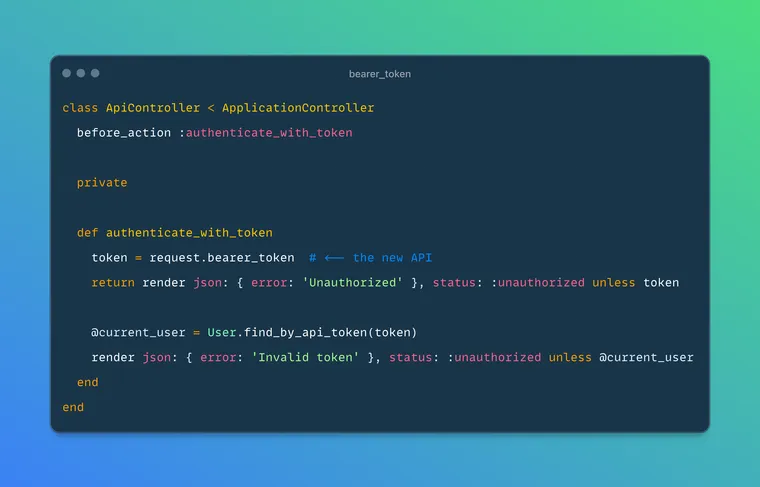
Two days ago, Rails added a new feature that makes working with bearer tokens easier. Before, you had to parse the Authorization header to extract them. Now, there's a dedicated bearer_token method on the request object that handles this for you.
 rails
rails
When building APIs that use bearer token authentication (OAuth 2.0 and JWT-based authentication), you typically receive tokens from the client in the Authorization header (or X-HTTP_AUTHORIZATION if you're using a proxy) with this format:
Authorization: Bearer <token>Before you'd extract the token by parsing the Authorization header manually, something like:
def current_token
  auth_header = request.headers['Authorization']
  return nil unless auth_header

  match = auth_header.match(/^Bearer (.+)$/)
  match[1] if match
end
Different variations of the above method appeared repeatedly across Rails applications, and each implementation might handle edge cases slightly differently.
Rails now provides a bearer_token method directly on the request object:
def show
  token = request.bearer_token
  # Use the token to authenticate...
end
Here's the implementation. It uses a regex to extract the token from the authorization header:
def bearer_token
  authorization.to_s[/\ABearer (.+)\z/, 1]
end
\A- Matches the start of the stringBearer- Matches the literal text "Bearer " (with a space)(.+)- Captures one or more characters (the actual token)\z- Matches the end of the string
The [..., 1] syntax extracts the first capture group (the token itself).
Note that it uses the existing authorization method, which checks multiple possible header locations:
def authorization
  get_header("HTTP_AUTHORIZATION")   ||
  get_header("X-HTTP_AUTHORIZATION") ||
  get_header("X_HTTP_AUTHORIZATION") ||
  get_header("REDIRECT_X_HTTP_AUTHORIZATION")
end
This is to ensure compatibility with various proxy and web servers that might use different header names.
If you read the test cases, you'll notice that the implementation handles a bunch of edge cases:
- No Authorization Header
request.bearer_token # => nil
- Non-Bearer Authentication
# Authorization: Basic dXNlcjpwYXNzd29yZA==
request.bearer_token # => nil
- Empty Authorization Header
# Authorization:
request.bearer_token # => nil
- Bearer with No Token
# Authorization: Bearer
request.bearer_token # => nil
- Proxy Headers
# X-HTTP_AUTHORIZATION: Bearer my-secret-token
request.bearer_token # => "my-secret-token"
Example
class ApiController < ApplicationController
  before_action :authenticate_with_token

  private

  def authenticate_with_token
    token = request.bearer_token
    return render json: { error: 'Unauthorized' }, status: :unauthorized unless token

    @current_user = User.find_by_api_token(token)
    render json: { error: 'Invalid token' }, status: :unauthorized unless @current_user
  end
end
The bearer_token API is a nice addition to Rails that standardizes bearer token extraction. All Rails apps can now extract them the same way without having to write custom token extraction logic every time and worrying about edge cases.
That's a wrap. I hope you found this article helpful and you learned something new.
As always, if you have any questions or feedback, didn't understand something, or found a mistake, please leave a comment below or send me an email. I reply to all emails I get from developers, and I look forward to hearing from you.
If you'd like to receive future articles directly in your email, please subscribe to my blog. Your email is respected, never shared, rented, sold or spammed. If you're already a subscriber, thank you.